Build the wall you actually have
Split the wall into panels to match yours. Lean them into a cave, turn them into a corner, or push a single point out until the shape is right.
Topout puts your wall on screen in 3D. Bend its panels until they match your gym, bolt real holds onto it, and keep every route you set in one gallery.
Runs in your browser. Sign in with Google.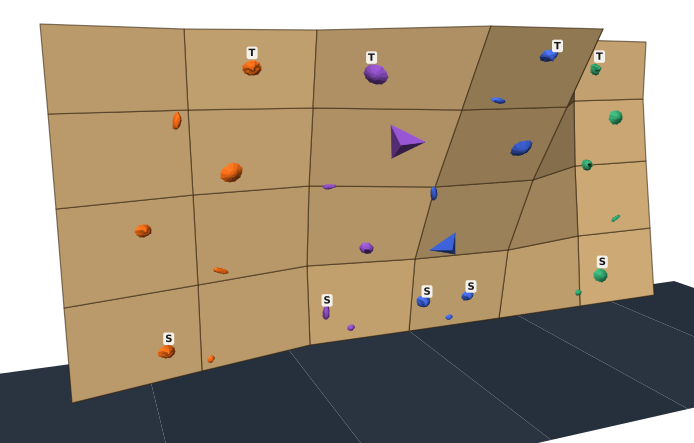
Split the wall into panels to match yours. Lean them into a cave, turn them into a corner, or push a single point out until the shape is right.
Click a panel to place a hold, drag to move it, spin it to any angle. Every route gets its own color, with start and top holds marked. Bring your own hold scans as .obj or .stl files.
 Jug
 Crimp
 Sloper
 Pinch
 Pocket
 Foot
 Volume
Each wall and each route lives in your gallery, with its grade, color and status. Reopen any of them in a click.
Try a crux on three different panels in a minute, check how a jug reads under the roof, and walk into setting day knowing what goes where.
You don't need to run a setting team to use Topout. If you climb on a home wall, or just hate watching a great problem get stripped, build a gallery of your own.
Climbing has always traded beta. You can already send any route as a link. We're building the rest, so setters and climbers can see what people are setting everywhere else.
Press Share and send the link. Anyone can open that route in 3D, without an account, and they can't change a thing.
Available nowBrowse walls from other gyms and home walls, and see how other setters use the same angles and holds.
Coming nextCopy a problem someone shared onto your own wall, then make it yours.
Coming nextStart your gallery now, and share a route whenever it's ready.
Start your galleryNo. Topout runs in your web browser. Sign in with your Google account, answer a few quick questions or skip them, and you're in the editor.
Yes. The wall is a grid of points you can split into panels to match yours. Lean panels forward or back, turn them left or right, or push single points in and out to get caves, arêtes and roofs.
Yes. Import 3D models as .obj or .stl files. Topout lays the flat side against the wall and simplifies dense scans so the editor stays fast.
Yes. Share any route to get a link. Anyone with it can view that route in 3D without an account. They can't change anything or see your other routes, and you can stop sharing whenever you like.
Model your wall, place your first route and start a gallery you'll keep adding to.
Open Topout